

How to Set Up a Home Office for Success
A well-designed home office can transform the way you work, boosting productivity, focus, and overall job satisfaction. Whether you’re working remotely full-time or just need a dedicated space for occasional tasks, creating an efficient and comfortable workspace is essential for long-term success.
In this guide, you’ll learn practical, easy-to-follow steps to design a home office that supports your workflow, minimizes distractions, and helps you perform at your best.
Why a Proper Home Office Matters
Working from the couch or kitchen table might seem convenient at first, but it often leads to poor posture, distractions, and reduced efficiency. A thoughtfully designed workspace creates a mental boundary between work and personal life.
A functional home office helps you:
- Stay organized and focused
- Improve productivity and time management
- Maintain better work-life balance
- Reduce physical strain and fatigue
- Create a professional environment for meetings
When your workspace is optimized, your mindset and performance follow.
1. Choose the Right Location
The foundation of a successful workspace starts with location. Ideally, your home office should be in a quiet, low-traffic area of your home.
Consider these factors:
- Natural light availability
- Distance from distractions (TV, kitchen, etc.)
- Noise levels
- Privacy for calls or meetings
If space is limited, even a small corner can be transformed into an effective workspace with the right setup.
How to Manage Your Time: Our Favorite Reads: A curated collection from Harvard Business Review that explores different approaches to managing time effectively and making room for meaningful work.
2. Invest in a Comfortable Desk and Chair
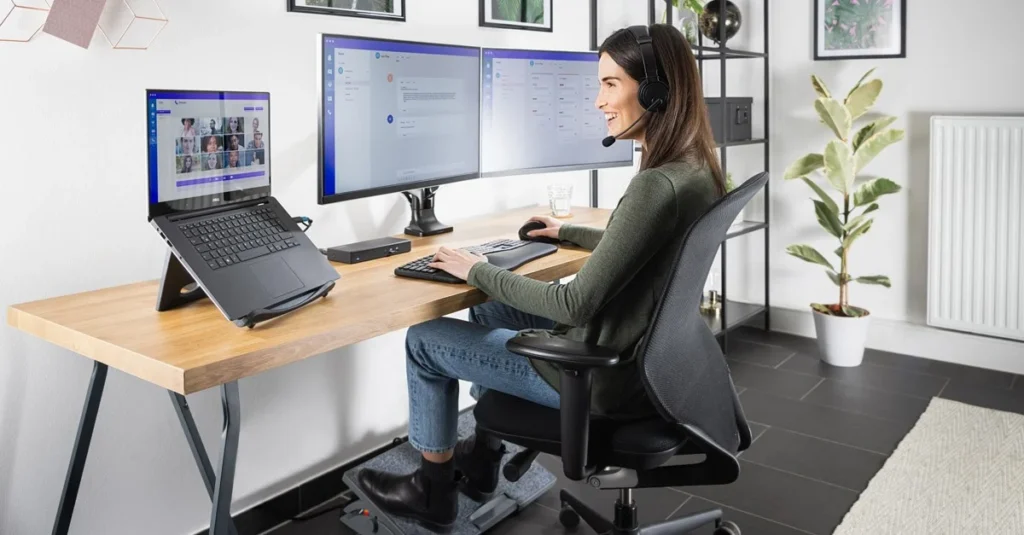
Your desk and chair are the backbone of your home office. Since you’ll spend hours sitting, comfort and ergonomics are crucial.
What to look for:
- Adjustable chair with lumbar support
- Desk at the correct height (elbows at 90 degrees)
- Enough surface space for your essentials
Poor ergonomics can lead to back pain, fatigue, and decreased productivity, so this is one area worth investing in.
3. Optimize Lighting for Productivity
Lighting plays a significant role in both mood and efficiency. A well-lit home office reduces eye strain and helps maintain focus throughout the day.
Best practices:
- Position your desk near a window for natural light
- Use a desk lamp for additional lighting
- Avoid harsh overhead lights or glare on screens
Balanced lighting creates a more comfortable and energizing workspace.
4. Declutter and Stay Organized
A cluttered workspace can lead to a cluttered mind. Keeping your home office tidy makes it easier to focus and find what you need quickly.
Organization tips:
- Use drawers, shelves, or organizers
- Keep only essential items on your desk
- Digitize documents when possible
- Clean up at the end of each day
An organized space supports a clear and productive mindset.
5. Set Up the Right Technology
Your tools can either boost your efficiency or slow you down. Make sure your home office is equipped with reliable and up-to-date technology.
Essentials include:
- A fast and stable internet connection
- A reliable computer or laptop
- Noise-canceling headphones
- Webcam and microphone for meetings
Optional upgrades like a second monitor or wireless keyboard can significantly improve workflow.
6. Personalize Your Space
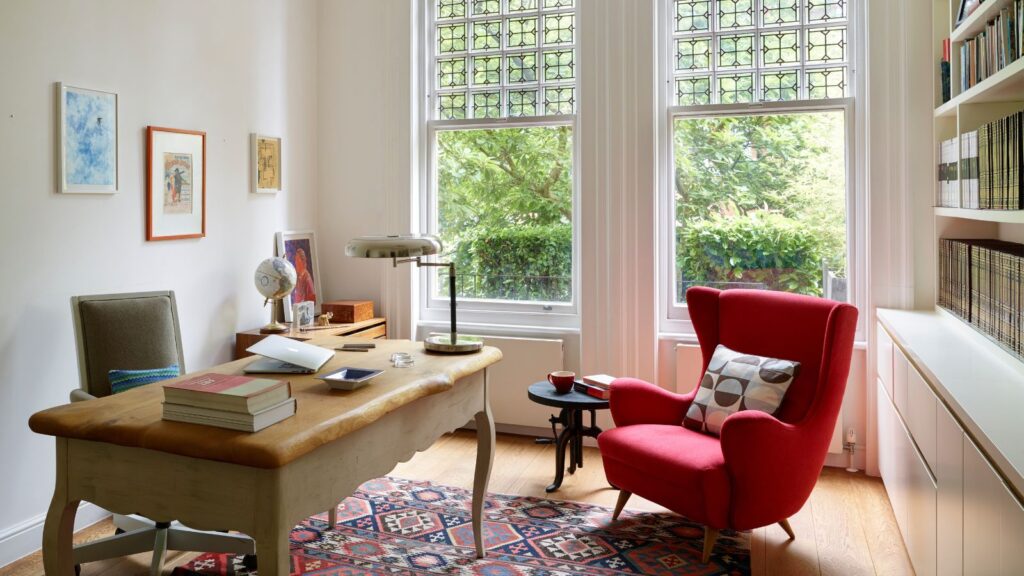
Your workspace should feel inviting and motivating. Adding personal touches can make your home office more enjoyable and inspire creativity.
Ideas to personalize:
- Artwork or motivational quotes
- Plants for a fresh, calming vibe
- Photos or meaningful décor
- A color scheme that energizes you
The goal is to create a space where you actually want to spend time.
7. Create a Distraction-Free Environment
Distractions are one of the biggest challenges when working from home. Setting boundaries is essential for maintaining focus.
Reduce distractions by:
- Setting clear work hours
- Communicating boundaries with family members
- Turning off unnecessary notifications
- Using apps that block distracting websites
A distraction-free home office helps you stay in control of your time and tasks.
8. Establish a Daily Routine
Even the best workspace won’t help if your schedule is chaotic. Creating a routine brings structure and consistency to your workday.
Simple routine tips:
- Start your day at the same time
- Plan your tasks in advance
- Schedule breaks
- End your workday with a clear stopping point
Consistency reinforces productivity and prevents burnout.
8 Time Management Tips for Students: A practical guide with actionable advice like creating schedules, setting reminders, and prioritizing tasks to stay organized and productive.
9. Focus on Ergonomics and Health
Your physical well-being directly impacts your work performance. An ergonomic home office setup helps prevent discomfort and long-term health issues.
Key ergonomic tips:
- Keep your screen at eye level
- Use a footrest if needed
- Take regular breaks to stretch
- Consider a standing desk option
Taking care of your body ensures sustained productivity.
10. Maintain Work-Life Balance

One of the biggest benefits—and challenges—of working from home is flexibility. Without clear boundaries, work can easily spill into personal time.
Maintain balance by:
- Logging off at a set time
- Avoiding work outside your workspace
- Creating a shutdown routine
- Scheduling personal time
A well-managed home office supports both professional success and personal well-being.
Common Mistakes to Avoid
Even with good intentions, some common mistakes can limit your productivity:
- Working from multiple locations instead of a dedicated space
- Ignoring ergonomics
- Overcrowding your desk
- Not setting clear work hours
- Using outdated or unreliable technology
Avoiding these pitfalls will help you build a more effective workspace.
For more flexible career ideas, explore these Five Remote Jobs You Can Do from Home to find opportunities that fit your lifestyle and work-from-home goals.
Final Thoughts
Creating the perfect home office doesn’t require a large budget or extra room—it’s about making intentional choices that support your work style. From choosing the right location to maintaining organization and balance, every detail contributes to your success.
Start small and improve your setup over time. With consistency and thoughtful design, your home office can become a powerful space where productivity, creativity, and comfort come together.
Explore our blog for more insights and helpful information.
Click here to learn more about our career and coaching services.
Have questions or feedback? Visit our Contact page (click here) — we’d love to hear from you.